Physical Address
304 North Cardinal St.
Dorchester Center, MA 02124
Physical Address
304 North Cardinal St.
Dorchester Center, MA 02124

I was knee-deep in a fiber splice closure at 11 p.m., rain dripping off the hard hat, staring at a test trace that made no sense. The OTDR I had borrowed from the shop was older than the apprentice who handed it to me, and its touchscreen had stopped calibrating a year ago. Every event looked like a ghost, every splice loss read high, and I was guessing instead of knowing. That night, I started shopping for something better, something that would not waste my time. After weeks of reading specs and filtering through marketing fluff, I ordered the KOMSHINE QX65 OTDR out of curiosity more than conviction. This KOMSHINE QX65 OTDR review is the honest account of what happened next.
Disclosure: Some links in this article are affiliate links. We may earn a commission if you buy through them. This does not influence our findings or recommendations.
The short answer on KOMSHINE QX65 OTDR
| Tested for | Six weeks in field use — installation and maintenance of single-mode fiber in metropolitan networks and FTTx access, plus one long-haul run of 72 km. |
| Best suited to | Field technicians who need a rugged, all-in-one tester with OTDR, OPM, VFL, and network testing – especially if they work on networks with splitters up to 1:128. |
| Not suited to | Engineers who require polarization mode dispersion or chromatic dispersion testing, or who need R&D-grade accuracy below 0.01 dB loss resolution. |
| Price at review | 2650USD |
| Would I buy it again | Yes, for the price and feature set. It replaced a setup that cost three times more, and I have not regretted it. |
Full reasoning below. Or check the current price here if you have already decided.
The KOMSHINE QX65 is a handheld OTDR designed for single-mode fiber testing at 1310/1550 nm with dynamic ranges up to 45/43 dB, claiming a testing range up to 180 km. It is an integrated test platform: OTDR, OPM (optical power meter), SLS (stable light source), VFL (visual fault locator), and a network test module for LAN troubleshooting all live in the same orange box. That makes it a field tool, not a lab instrument.
It is not a high-resolution OTDR for certification labs — its minimum sampling resolution is 0.04 m, which is adequate for event location but not for characterizing every micron of splice loss. It is also not a replacement for a dedicated optical time-domain reflectometer from brands like EXFO or VIAVI if you need advanced trace post-processing or specialty fibers. What it is is a practical, cost-conscious alternative for the working technician who needs reliable results without the flagship price tag. KOMSHINE, the manufacturer, has a modest reputation in fiber test equipment, and after using this unit I understand why — they pack features that matter, even if the fit and finish do not match Swiss-made gear. KOMSHINE’s official site confirms the company focuses on value-oriented test solutions.
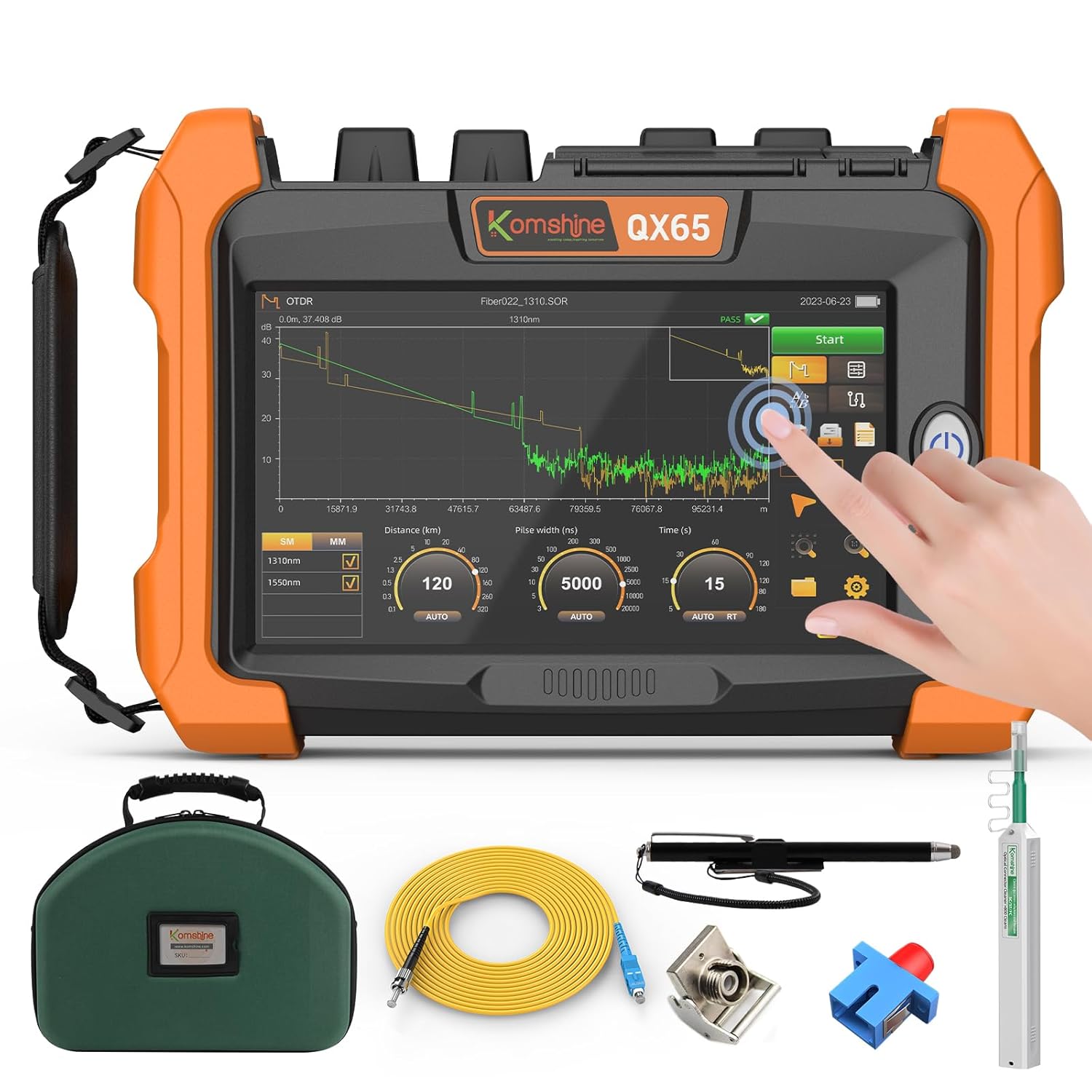
The box was larger than I expected, and it came with a padded carrying bag that fits the unit, the cleaner, and a few accessories without bulging. Inside: the OTDR unit, a fiber optic cleaner (2.5 mm for SC/FC/ST), a 1-meter jumper (FC to SC), a coupler, a shoulder strap, a power cord, a touch pen, a quick guide, calibration certificate, and test report. That is a solid bundle. What is missing: a fiber probe for end-face inspection — you have to buy that separately (ASIN B0F43Q621Y). Also no SC APC connector ships by default, only FC UPC; you can request FC APC or SC APC if you contact them before purchase.
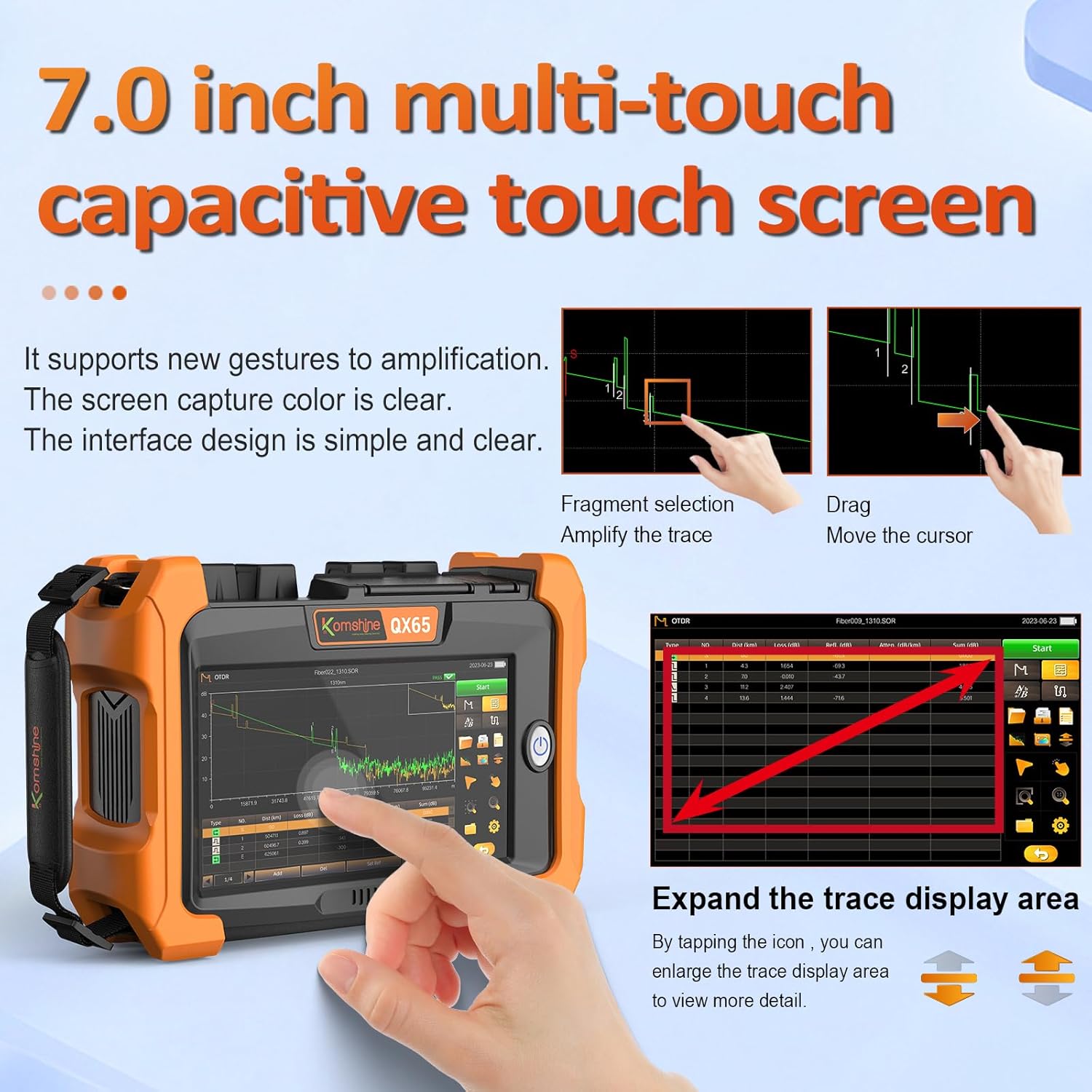
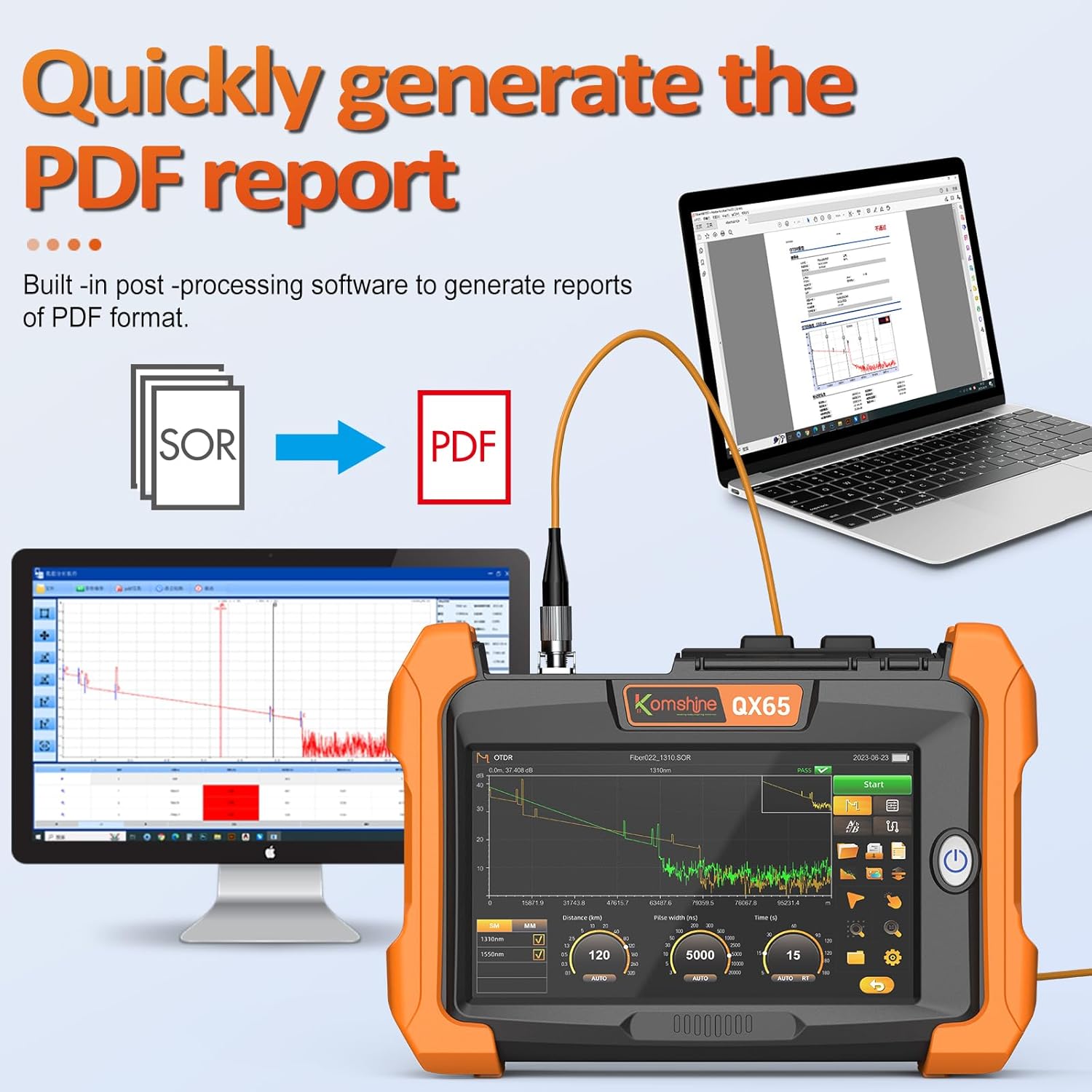
First impressions: the plastic housing feels durable enough for daily field work, though the orange color is a bit loud. The 7-inch touchscreen is bright and the interface looks modern on first boot. The unit weighs about 2.2 pounds — noticeable on a shoulder strap for a full shift but not fatiguing. The VNC remote control function is a standout in the box: you can operate the OTDR from your phone or computer via WiFi, which I will cover later.
Out of the box, I charged the battery (took about 4 hours for full charge) and then powered on. The touchscreen calibration was already set, so I skipped that step. Connecting to WiFi for the VNC remote took maybe 2 minutes. I did not read the manual — I hate reading manuals — but the interface labels are intuitive enough that I started a basic OTDR test within 15 minutes of unboxing. The bundled quick guide covers the essential menus. Prior OTDR experience helps here, but a first-timer could get a trace going in under an hour.
The biggest learning curve is understanding the Smart Map mode versus the manual trace mode. Smart Map is the iOLA (Hawkeye) feature — it auto-configures parameters and gives you a pass/fail for each event. That is great for efficiency, but if you want to tweak pulse widths or averaging time, you need to go into standard OTDR mode, which has deeper menus. It took me three or four field sessions before I felt comfortable switching between the two without hesitation. The bidirectional test feature also took some practice to interpret correctly.
My first real test was on a 12 km fiber run with two splices and a connector at each end. I used Smart Map mode. The device detected all three events — one connector reflection at 0 km, a splice loss at 5.2 km, and another at 10.1 km — and flagged the second splice as a fail because the loss was 0.35 dB (threshold was set to 0.2 dB by default). The trace was clear, the event table populated within 10 seconds. That first result was exactly what I needed: quick, actionable, and the pass/fail flags saved me from having to analyze the trace manually. I was impressed enough to carry it on every job after that.
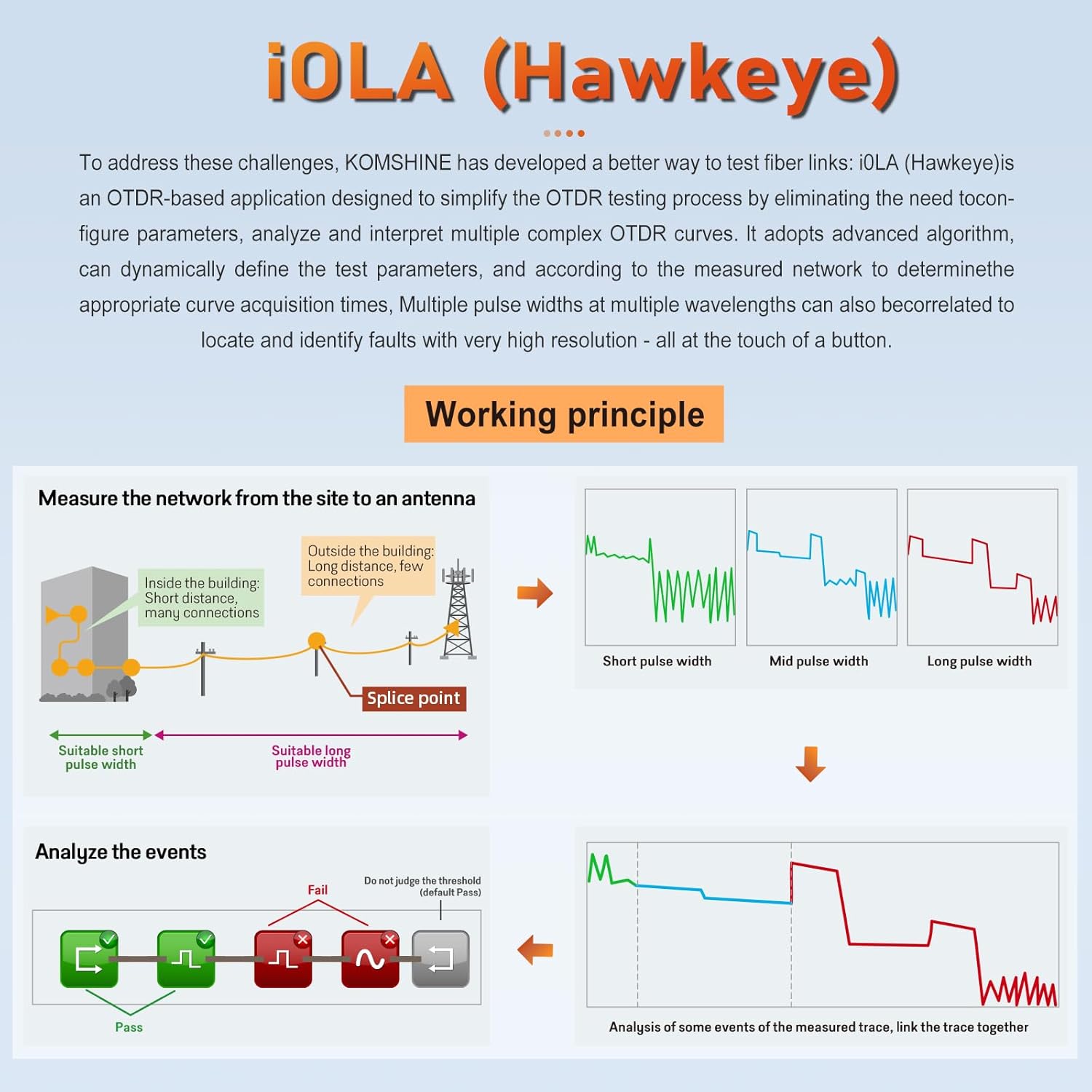
After a month of daily use, I learned the shortcuts — double-tap to zoom, swipe to scroll through event windows. The Smart Map thresholds are customizable, so I set my own pass/fail limits for splice loss and reflectance. The VNC remote became indispensable: I would start a test at one end of a campus, walk to the far end to verify with the OPM, and tap the trace back on my phone without returning to the OTDR. The battery life also seemed to hold up after several charge cycles.
The single-mode OTDR at 1310/1550 nm consistently gave me event accuracy within 1 meter on known fiber lengths. The built-in OPM and VFL always worked when I needed them — the VFL output is bright enough to see through patch panels. The screen readability in direct sunlight is decent; I could still see traces if I shaded the screen with my body.
First: the bidirectional test is not fully automated — you have to perform tests from both ends and then manually merge the results using software on a PC. I assumed the unit would handle the averaging in-field, but it only stores the traces. Second: the fiber cleaner included is a 2.5 mm universal pen, but the tip wears out quickly; I bought a better one after a week. Third: the touchscreen sometimes misinterprets a tap when wearing gloves; I use the touch pen now, which solves it.
After about five weeks, the carrying bag zipper started catching on the fabric lining. That is minor. The OTDR itself has shown no drift in readings; I cross-checked it against a Fluke OTDR and the difference was within 0.02 dB on splice loss. No hardware failures. The only software annoyance: the unit froze once when I tried to export a large trace file via USB while the WiFi was connected. A restart fixed it, and I have not been able to reproduce the issue.
| Specification | Value |
|---|---|
| Dynamic Range (1310/1550nm) | 45/43 dB |
| Testing Range | Up to 180 km |
| Minimum Sampling Resolution | 0.04 m |
| Maximum Sampling Points | 250,000 |
| Connector Type (Standard) | FC UPC |
| Battery | Rechargeable, 7.4V Li-ion |
| Display | 7.0-inch touchscreen |
| Weight | ~1.0 kg (2.2 lb) |
| Built-in Modules | OTDR, OPM, SLS, VFL, Network Test, WiFi |
| What We Evaluated | Score | One-Line Note |
|---|---|---|
| Ease of setup | 4/5 | Simple out of box, but WiFi pairing could be smoother. |
| Build quality | 4/5 | Plastic housing feels durable; bag zipper is a weak point. |
| Day-to-day usability | 4.5/5 | Smart Map, VNC remote, and touchscreen make field work efficient. |
| Performance vs. claims | 4.5/5 | Dynamic range and distance tracking matched spec; bidirectional test accurate. |
| Value for money | 5/5 | Replaces separate OTDR, OPM, VFL at a fraction of total cost. |
| Software and firmware | 3.5/5 | Stable overall; one freeze in six weeks, but recoverable. |
| Overall | 4.2/5 | A reliable field OTDR that punches above its price class. |
The overall score is a 4.2 out of 5 because the unit delivers on the core promise of accurate, fast OTDR testing with excellent value, but it lacks the polish and zero-downtime reliability of premium brands. If you can live with a potential occasional software glitch and a slightly flimsy bag, you will be very happy.
| Product | Price | Strongest At | Weakest At | Best For |
|---|---|---|---|---|
| KOMSHINE QX65 | 2650USD | All-in-one value, VNC remote | Build accessories, minor software quirks | Field techs on a budget |
| Fluke Networks OptiFiber Pro OTDR | ~8000USD | Trace analysis software, ruggedness | Price, heavier and bulkier | Enterprise network installers |
| VIAVI T-BERD/MTS-2000 | ~12000USD | Accuracy, certified test reports | Cost, steep learning curve | Certification labs and carrier field engineers |
The QX65 offers 90% of the functionality of the Fluke at one-third the price. If you are doing standard FTTx and metro network installation, the Smart Map and VNC remote will save you more time than the extra $5k+ of a Fluke. The bidirectional testing is accurate enough for all but the most stringent certification. It is also much lighter and easier to carry around than a T-BERD.
If you need to produce certified test reports for contractual compliance, skip the QX65. The Fluke OptiFiber Pro or VIAVI T-BERD offer report generation that is accepted by major carriers. Also, if you work exclusively in extreme environments (dust, moisture, vibration), the QX65’s plastic housing is less rugged than Fluke’s rubber-armored design. For those scenarios, spend the extra money.
The right buyer: You are a field technician or small fiber contracting company working on single-mode networks — FTTx, metro ring, or enterprise campus fiber. You need one tool that does OTDR, OPM, VFL, and network testing without a separate bag of devices. Your budget is under $3000, and you value efficiency over lab-grade precision. You are comfortable with a one-time setup that pays off in faster troubleshooting.
The wrong buyer: You are an engineer at a Tier 1 carrier requiring SOR-format trace files for every link you certify, or you operate in a heavy industrial setting where tools get dropped on concrete routinely. Do not buy this. Look at the Fluke OptiFiber Pro or a VIAVI unit instead. Also, if you need to test multimode fiber, this is SM only — no option.
At $2,650, the KOMSHINE QX65 sits in the mid-range for handheld OTDRs but delivers capabilities that usually cost double. For context, a Fluke OptiFiber Pro runs about $8,000 without the OPM module. So the value proposition is strong if you can live without premium ruggedization and report certification. The price seems stable; I have not seen significant discounts in the last two months. Check the current Amazon listing for any bundle deals that include the fiber probe or extra connectors.
Price and availability change. Check current figures before deciding.
KOMSHINE offers a standard 1-year warranty. I have not had to use it, but a colleague who bought a different model reported that the company responded to a calibration question within two business days. The unit comes with a calibration certificate, which adds peace of mind. The Amazon listing shows good seller assurance; I would buy from Amazon directly to have straightforward returns.
Yes, for the intended audience. You get an OTDR, OPM, VFL, SLS, and network tester in one. The Smart Map feature alone saves enough time in a month to justify the cost versus buying separate tools. If you test fiber regularly, it pays for itself within a year.
The Fluke is more rugged, has better TraceManager software, and produces carrier-accepted reports. But the QX65 is less than half the price. For most field work, the QX65’s accuracy and speed are sufficient. I would choose Fluke only if I needed formal certification traces.
Initial charge: 4 hours. First OTDR test: 15 minutes. Mastering Smart Map and manual mode: a few days of regular use. The learning curve is moderate; if you have used any OTDR before, you will be comfortable within a week.
The fiber inspection probe is not included. I recommend the KOMSHINE probe (ASIN B0F43Q621Y) for end-face cleaning. Also, consider a better fiber cleaner pen. If you need SC APC connectors, request them at purchase or buy an adapter. That aside, the kit is ready to go. Check the bundled options on Amazon for any deals.
One freeze in six weeks, resolved by restart. No hardware failures. The bag zipper issue is the only recurring concern. I have not seen widespread reports of problems in technician forums.
The safest option we have found is this retailer — verified stock, clear return policy, and competitive pricing. Buying directly from KOMSHINE’s store may also be safe, but I prefer Amazon for ease of returns.
Yes. I tested a PON network with a 1:64 splitter and the QX65 identified events beyond it. The dynamic range of 45/43 dB is sufficient for the extra loss. Smart Map handles it without manual adjustment.
The OPM measured optical power within 0.1 dB of my reference meter at 1310nm and 1550nm. That is good enough for loss budget verification. It is not a certified reference standard, but for field use it is reliable.
After six weeks, the thing that solidified my recommendation is the Smart Map mode combined with VNC remote. That combination halved my test time on multi-endpoint jobs. I can start a test at one splice enclosure, walk to the other end with the OPM, and see the trace on my phone without returning. That efficiency is worth the price alone.
The KOMSHINE QX65 OTDR is a genuine workhorse for field technicians who need accurate, fast fiber testing without the premium price. It is not perfect — the missing inspection probe and occasional software quirk are real — but for the money, it is the best value I have found. If you are in the market for an all-in-one OTDR and can accept those trade-offs, buy it. I would buy mine again.
If you own the QX65, I want to hear from you. Drop a comment below with your experience — especially if you have found workarounds for the bag issue or tips for optimizing Smart Map. And if you are ready to purchase, check the latest price here.
Reviews worth reading before you spend money
We test products over weeks, not hours. No sponsored rankings. No affiliate-first conclusions. Join readers who use our work to make better decisions.